

 Amritha Varshini
 What is Keras?
Keras is a tool for machine learning specialists who work with Python, mostly used due to the convenience of mathematical calculations. Developers use Keras to create, configure, and test machine learning and artificial intelligence systems, primarily neural networks.
What are Keras Models?
Keras works with models or schemes by which information is distributed and transformed. Machine learning is processing information using a programmed network, where certain conclusions are drawn based on certain data. The network structure is called a model and is often presented as a graph, diagram, or table.
Prerequisites for Installing Keras
- A server with root-level access
- Python installed
- TensorFlow installed
This tutorial is performed with CentOS 7.
Install Keras via Python & TensorFlow
Install Python 3
To install Keras, Python is required to be installed on your computer since Keras is based on Python. It is recommended to have the latest version of Python, such as Python 3 for example.
Step 1: Update the Environment
In order to make sure that we are working with the most up-to-date environment possible in terms of our packages, we can run the following command:
[root@centos7 ~]# yum update -yStep 2: Install Python 3 on CentOS 7
Now that the environment is up to date, all we need to do to install Python 3 is run the following command:
[root@centos7 ~]# yum install -y python3That’s it! Python 3 is now installed! Another helpful idea to consider is that Pip (also known as Pip3), the Python package manager for Python 3, is installed alongside the Python 3 package, so we don’t have to worry about that as an additional installation step.
Step 3: Verify Installation
To ensure that Python 3 is installed and usable, we can drop it into a Python 3 shell by running the following command:
[root@centos7 ~]# python3
Python 3.6.8 (default, Aug  7 2019, 17:28:10)
[GCC 4.8.5 20150623 (Red Hat 4.8.5-39)] on linux
Type "help", "copyright", "credits" or "license" for more information.

>>>
You should see the version of Python 3 installed on your system as well as a change in the command prompt characters.
However, in some cases, you might want to have the most recent version of Python available, and that’s where a source installation can come in handy for which we have a detailed article that covers installing Python 3 on CentOS 7.
Install TensorFlow
TensorFlow is one of the backend engines that we need to install before Keras can be installed.
Step 1: Create a Virtual Environment
You need to create a virtual environment when installing TensorFlow. First, create a folder for your project using the following commands:
# mkdir test
# cd test
Use the following command to create a virtual environment with Python. It creates a virtual environment named tf-virtual-env. Replace this with your chosen name:
# python3 -m venv tf-virtual-envInside this environment are many pre-installed Python libraries and tools needed in the project, such as the Package installer for Python (Pip). The following command activates the environment:
# source tf-virtual-env/bin/activateThe prompt changes in the terminal, which means you activated it successfully:
(tf-virtual-env) # _Type deactivate at the prompt and press Enter to exit the environment.
TensorFlow requires at least version 19.0 of Pip. Use the following command to ensure you have the latest version:
# pip install --upgrade pipStep 2: Installing TensorFlow
This tutorial installs a version that does not use your GPU. You can install a TensorFlow version that offers GPU support.
Use the following command to install TensorFlow without GPU support:
# pip install --upgrade tensorflowUse the same command for updating TensorFlow.
Step 3: Test the Environment
To test your environment, open Python bash:
# pythonThen, type the following command. The first line will import the TensorFlow packages into the Python interpreter session, while the second line will print the TensorFlow version:
import tensorflow as tf

 print(tf.__version__)'
Install Keras
Thanks to a new update in TensorFlow 2.0+, if you installed TensorFlow as instructed, you don’t need to install Keras anymore because it is installed with TensorFlow.
To confirm it, open Python bash:
# pythonAt the prompt, run the following commands:
import keraskeras.__version__For those using TensorFlow versions before 2.0, here are the instructions for installing Keras using Pip.
Step 1: Installing Keras
Install Keras with the following command:
pip3 install kerasThe terminal shows the confirmation message once the process completes:
Collecting keras
  Obtaining dependency information for keras from https://files.pythonhosted.org/packages/2e/f3/19da7511b45e80216cbbd9467137b2d28919c58ba1ccb971435cb631e470/keras-2.13.1-py3-none-any.whl.metadata
  Downloading keras-2.13.1-py3-none-any.whl.metadata (2.4 kB)
Downloading keras-2.13.1-py3-none-any.whl (1.7 MB)
   ━━━━━━━━━━━━━━━━━━━━━━━━━━━━━━━━━━━━━━━━ 1.7/1.7 MB 11.1 MB/s eta 0:00:00
Installing collected packages: keras
Successfully installed keras-2.13.1
WARNING: Running pip as the 'root' user can result in broken permissions and conflicting behaviour with the system package manager. It is recommended to use a virtual environment instead: https://pip.pypa.io/warnings/venv
Step 2: Verify Installation of Keras
Verify the install of Keras by displaying the package information:
pip3 show kerasThe output will be as shown below:
Name: keras
Version: 2.13.1
Summary: Deep learning for humans.
Home-page: https://keras.io/
Author: Keras team
Author-email: [email protected]
License: Apache 2.0
Location: /opt/rh/rh-python38/root/usr/local/lib/python3.8/site-packages
Requires:
Required-by:
Deprecation of the Git Clone Keras Install Method
Keras was previously installed by cloning the GitHub repository, unpacking the packages, and installing the software. The Keras team deprecated the GitHub repository and moved the applications into the core Keras repository and the TensorFlow Pip package:
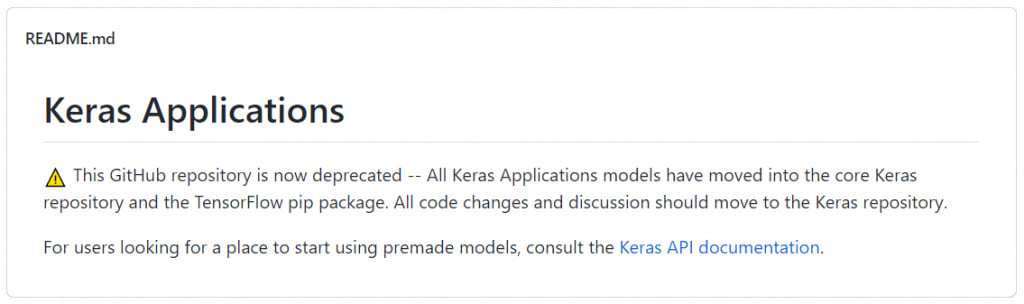
The recommended Keras installation method from the Keras team is via TensorFlow version 2+.
Importing Keras Libraries
When we create a Python virtual environment, it already contains most of the important libraries. Here is the list of the most important Python libraries:
- Numpy
- Pandas
- Scikit-learn
- Matplotlib
- Scipy
- Seaborn
To confirm the Numpy library, use the following command:
import numpy as np

ndarray = np.ones([3, 3])

print("TensorFlow operations convert numpy arrays to Tensors automatically")
tensor = tf.math.multiply(ndarray, 42)
print(tensor)
The output should be as follows:
tf.Tensor( [[42. 42. 42.]
     [42. 42. 42.]
     [42. 42. 42.]], shape=(3, 3), dtype=float64)
Updating Keras
Since Keras installs alongside Tensorflow, they also update together. Use the command below, the same one to update TensorFlow, to update Keras:
# pip install --upgrade tensorflowBottom Line
There are ways to install Karas and Tensorflow without a virtual environment. Still, it can be risky and more complex than the commands of pre-configured environments. Whether installing Keras using Pip via Python or TensorFlow, this tutorial helps you get it up and running for your next deep learning project.
Do you need a CentOS or AlmaLinux machine for your next Keras install? Liquid Web has these options for VPS hosting, cloud dedicated servers, dedicated servers, and GPU hosting. Contact our sales team today for setup options.
Original Publication Date
This article was originally published in June 2022. It has since been updated for accuracy and comprehensiveness.