

Deleting a cPanel Account from WHM
As we discussed in our article Creating a cPanel User Account, WHM is a utility for server-level task management. Occasionally, it may be necessary to remove a cPanel account from your server. You’ll use WHM to delete the cPanel account.
- Once you are logged into WHM, Type the word list in the search bar on the top-left, the menu should bring up the Account Information section of WHM, where you can click on list accounts.

- From the list accounts page, you can see all of the cPanel accounts on your server.
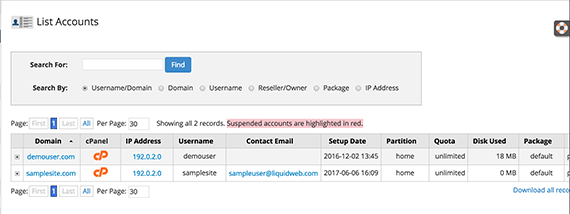
- Select the account you intend to delete by clicking the [+] icon in the row of the account.
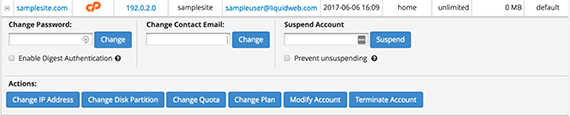
- Once the account is open, you will see many options for managing the account, including termination.
- To delete the account, click Terminate Account.
Warning:
There is no “undo” button once the account is terminated. Be sure to take a backup just in case. For information on how to backup your cPanel account, please see our article Taking a Manual Backup in cPanel. 
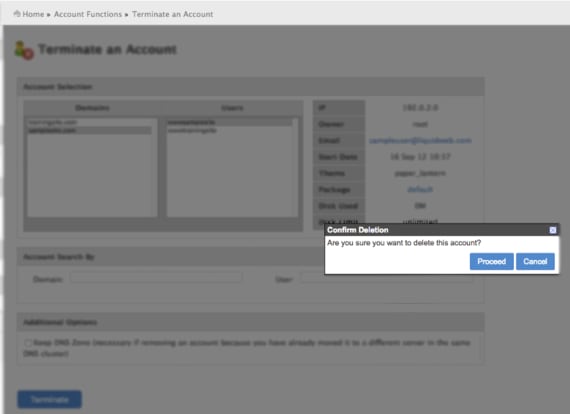
- An Account Selection page will open to confirm the domain and the users you are deleting. You can also choose to show all suspended accounts and select multiple accounts for termination.
Note:
When an account is deleted, the DNS Zone is also deleted by default. If you are moving the site to a different server but want to keep the DNS hosted on this same server you can click Keep DNS Zone so that it is not deleted. - A pop-up will appear to confirm that you want to delete the account. Click on Proceed to terminate the account.
- The details of the deletion will show as the deletion process makes progress.
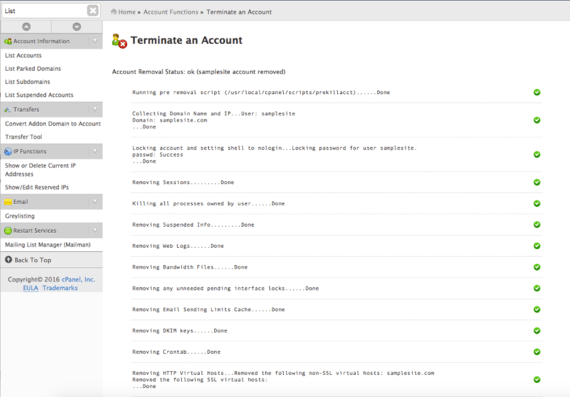
- Once the account deletion is complete, a email notification will be sent out to the server administrator, if configured.