

Listing Your cPanel Accounts
Sometimes it’s necessary to see all of the cPanel accounts on your server. You may be updating your customer base, trying to identify unused accounts, or project licensing costs for the coming year. Since cPanel licensing has recently been adjusted to include a variable based on the number of accounts on the server, you may want to get a list of those accounts for your review. Fortunately, it’s a simple process.
- Once you are logged into WHM, type the word list in the search bar on the top-left. The menu should bring up the Account Information section of WHM, where you can click on list accounts.
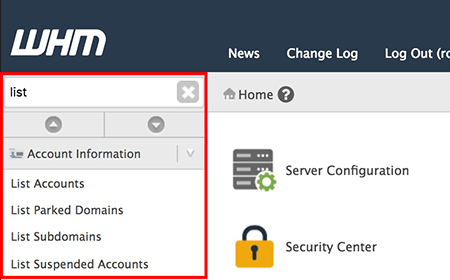
- From the list accounts page, you can see all of the cPanel accounts on your server.
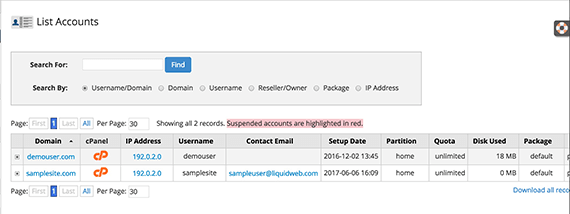
- You can modify an account by clicking on the account name and following the prompts.
If you are trying to calculate possible pricing implications based on the number of cPanel accounts on your server, see our cPanel Pricing Breakdown for more information.
For more information about adding or deleting cPanel accounts from your server, see Creating a cPanel User Account, Deleting a cPanel Account from WHM, or How to Mass Create cPanel Accounts.