

Premium Business Email Archive
Email archiving can be an important tool for longer term storage of important email messages and may be required for your business. If you need email archiving, you can add this service to your domain for your Premium Business Email mailboxes.
How Can Liquid Web Help?
With properly archived and retrievable email, your messages are automatically retained and immediately accessible when requested. In the Liquid Web archive you can:
- Capture, index, and safely store up to nine copies of auditable email; including header information, body, and attachment content.
- Use full text search capabilities to find email based on message components in a secure web-based search and discovery interface.
- Maintain original message integrity using WORM technology to assign date/time stamps and unique headers to safeguard against deletion.
- Export to standards-based formats like .pst, .pdf, .txt, and mime.
- Gain unlimited storage.
How Safe is My Data with Liquid Web?
During transmission and storage, your data remains secure. Liquid Web provides you with:
- Top tier, physical and network-secure data centers.
- DoD standards-based encryption with HMAC-SHA1 authentication for tamper-proof data.
- The most current SSL encryption protocols for data center-to-device transmissions.
- Dynamically allocated, dedicated virtual machines delivering superior performance even during activity spikes.
- An audit trail for every system interaction with reports detailing
users, activity, date, time, and IP address.
Email Archiving only archives new incoming/outgoing messages from the time of activation forward. Pre-existing messages in mailboxes will not be archived. Older messages will require an import which is subject to a one-time fee. Contact sales for more information.
Enable archiving
- The first step to archive email is to enable archiving for the domain. Log in to your Liquid Web Account, click Domains, then click the Business Email tab.

- Select the domain(s) and check the box next to Archiving. This will turn archiving on for all the mailboxes in the domain. Click Save.
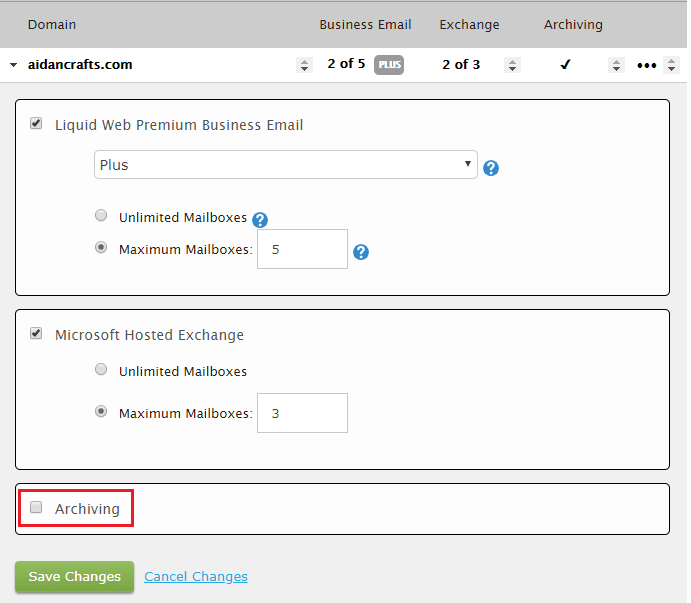
- You should now see a check mark under the Archiving column for the domain.

Manage your email archives
- Use the link to login to your Premium Business Email Control Panel or click on Email Control Panel in your Business Email Dashboard.

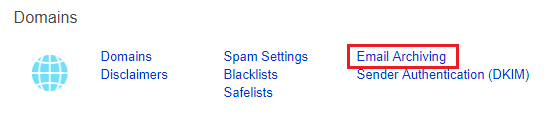
- Scroll down to the Domains section. In the far right column of this section, check Email Archiving.
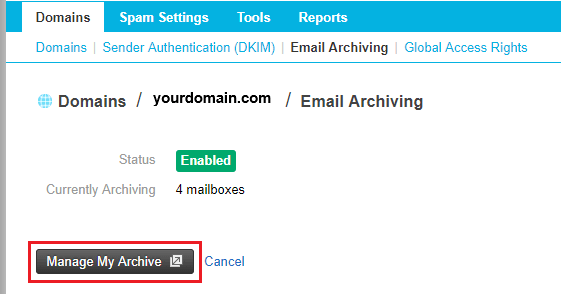
- Select the domain for the archive that you want to log into and then click Manage My Archive. You’ll be taken to a new interface to manage your email archives.
Add or edit archive users
While you can manage your archives as the administrative user, it may be helpful to add special “archive users” to your account. You can add or edit archive users as needed to manage your email archives.
Working with archives
Working with email archives is essential for maintaining efficient communication management and ensuring compliance. Premium Business Email allows users to easily access or download archived emails for long-term storage and reference. Additionally, the platform provides robust capabilities to search through archived emails, making it simple to locate specific messages using filters such as sender, recipient, subject, or keywords. These features help streamline email management and support secure, organized recordkeeping.